
Hi and welcome to the newsletter.
The newsletter has been inactive for a while as I was having email spam problems on the sign up page. So before my email account got blocked I decided to take a break and concentrate on other tasks.
Hopefully I will be spared the spam going forward.
In this month issue we are going to look at
- Node-RED version 5
- Version control
- Simple gates in node-RED
- Stopping,Starting and debugging Flows
On the node-RED side the major change since my last newsletter has been the release of node-RED version 5. The release notes are available here
The changes appear mainly to target the editor but one change you should be wary of is the Node.js version requirements which basically means you can upgrade a raspberry Pi 3B to version 5. here are the relevant paragraphs.
Node-RED 5.0 requires a minimum of Node.js 22.9.0 to run – it will not run anything earlier.
As the Node.js project no longer create 32bit ARM (
arm/v7) based images, we are no longer able to support running on older Raspberry Pis (3b or earlier) as they cannot run the required 64bit OS.
You can check your current Node.js version on the command line using node -v.
To upgrade on Ubuntu/Debian according to chatGPT use:
sudo apt update
sudo apt install -y curl

curl -fsSL https://deb.nodesource.com/setup_24.x -o nodesource_setup.sh
sudo -E bash nodesource_setup.sh

sudo apt install -y nodejs
You can also use nvm . I would check with chatGPT or similar as it gives some useful tips.
One interesting new feature in node-RED version 5 is the ability to call a link node from within a function node.
I will be delving into these new feature in the next newsletter.
Version Control
Node-RED has a projects setting which adds version control to node-RED via Github see here for details.
However this may be a little to complicated for many and so you need to consider manual version control.
This you can do by manually copying flows before major changes and including the version number as part of the flow name as well as in the flow.
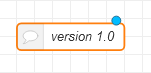
Currently I add a simple comment box with the version number in it to my flows, as shown below:
Simple Gates
Very often you will need to stop messages from passing through a flow. To accomplish this you use some form of gate.
There are several third party gate nodes available and I did a video on using the simple gate node a while ago, and you can see it here.
Using the Function Node as a Gate.
The function node can also be used to create a simple gate that works very similar to the gate node.
It works by returning the msg object or not returning the msg object depending on the control setting.
A simple demo flow is shown below:
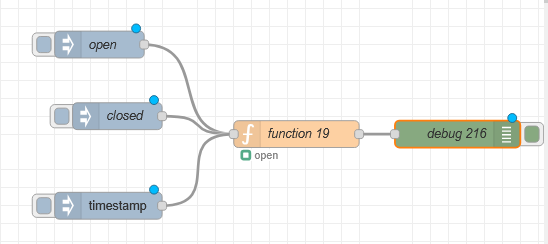
The flow can be downloaded from here.
Stopping and Starting Flows
In node-red version 3 the ability to stop and start flows has been added to the editor.
Currently it is not enabled by default. To enable it you need to edit the settings.js file and add the following
runtimeState: {
   enabled: true,
   ui: true
}
A new option appears on the deploy options drop down.
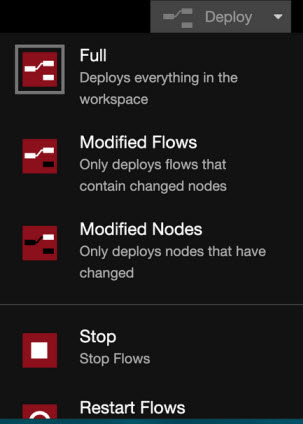
Note: All flows are stopped and not individual flows
Safe Mode for Flow Errors
If you are having problems starting node-red due to a mistake in a flow then you can start node-red using the safe mode.
node-red –safe
This starts node-red but doesn’t run the flows. You can now edit the flows and then deploy to run.
Tutorials You may have missed:
- Node-RED Event Logging using the Custom Logger
- Using Logic Gates In Node RED
- Timing Events in Node-Red
My Other Sites
You may or may note be aware that I have two other related sites that you may find useful. They are:
Rgds
Steve